
ESTABLISHED . EXPERIENCED
Purveyors of the finest brand. UX/UI design, and print work
About

Experienced Senior Interaction Designer (UX) with a proven track record of delivering innovative solutions for leading technology companies. Currently, at Google's AGA Search division, spearheading device software development and implementing cutting-edge search methodologies for the AGA App, -1 Screen, and Homescreen Widget. Specializes in search logic within Android architecture and integration within Omnient & Ambient environments. Collaborates closely with engineering to shape the long-term vision of AGA Search, including the development of solutions for high-profile events like Google I/O Launch.
Previously, at Google's Android division, contributed to device software development and designed immersive material experiences for wearable devices. Led sync exploration projects and collaborated with senior stakeholders and engineering teams to drive innovation in wearable technology. Demonstrated expertise in app design, NPI work, and senior stakeholder management.

Creating seamless experiences
for everyday users
through great design.
Prior roles include Senior Product Designer at Nothing, focusing on app design for wearable devices and connected apps for Ear1, EarStick, and Ear 2. Extensive experience in Agile environments, Figma flows, accessibility development, and user testing methodologies. Earlier career highlights include roles at Apple and Dyson Limited, where contributions ranged from responsive collaboration projects and Atlassian toolkit development to
GUI toolkit and design pattern audits and Siri voice control designs. Lead designer in decvice led app for Dyson Lightcycle Morph.
Bringing a diverse skill set encompassing UX/UI design, Agile methodologies, accessibility development, and user testing, with a strong focus on creating seamless and intuitive user experiences across a variety of platforms and devices.

Design Process

1. Research
User reasearch, testing and implmenting findings
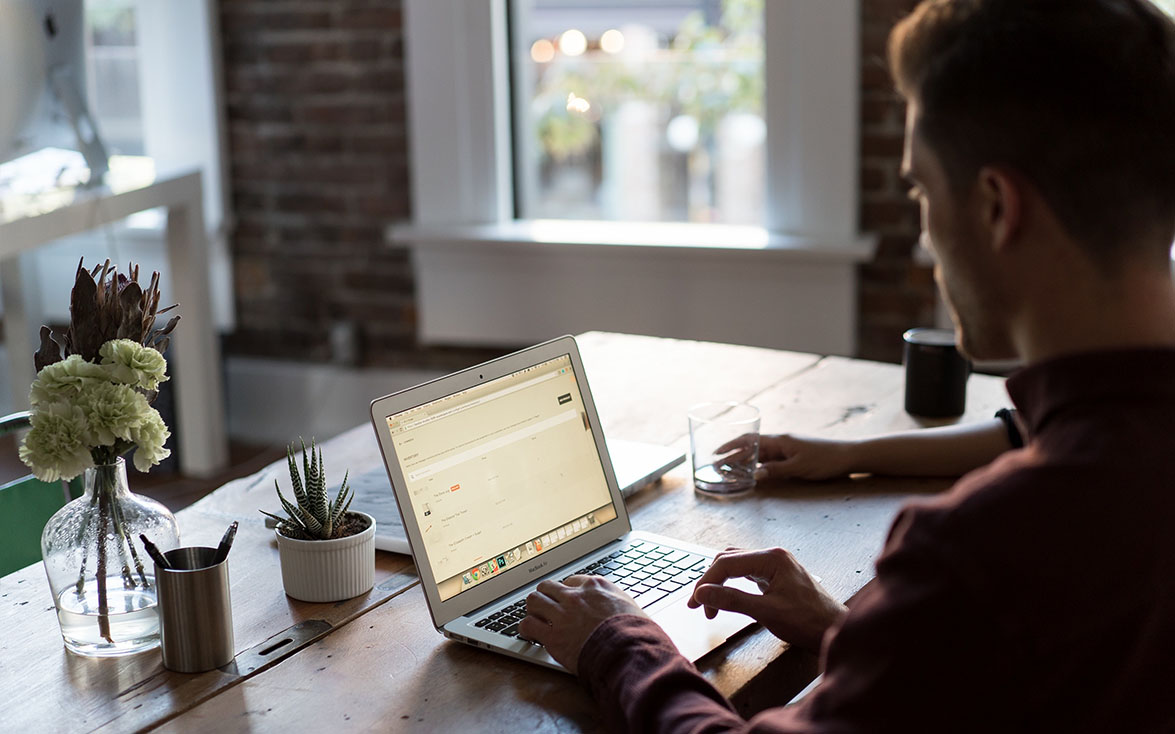
2. UX
Wireframe and execute flawless user flows & journeys

3. Launch
Produce end to end designs and experiences that engage the user
Print Case Study
U-Test Diagnostics
Home testing for everyone. Bridging the traditional medical gap.

A new way to test
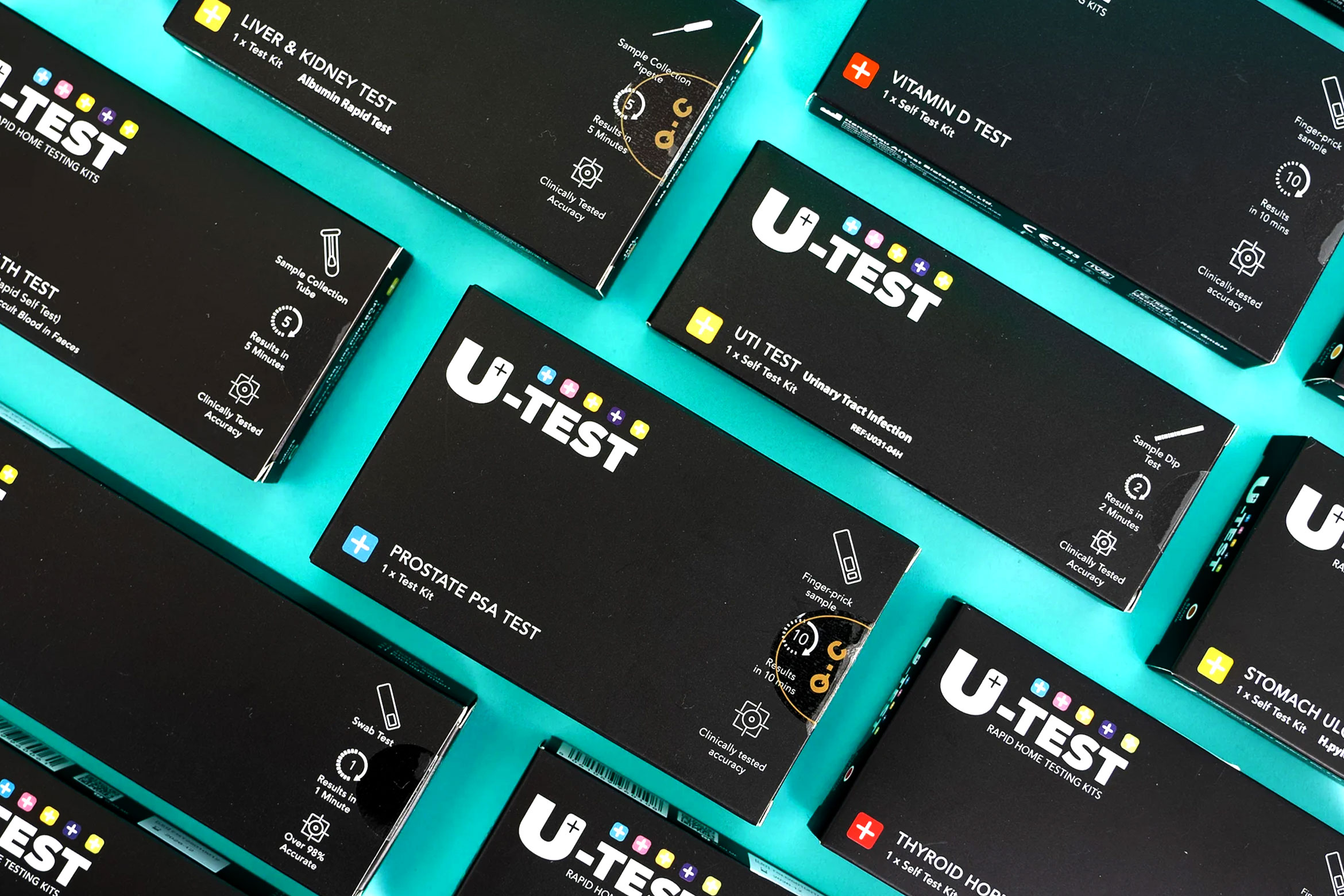
U-Test Diagnostics looks to bridge the gap between traditional medical diagnostics and expensive private referrals. the peace of mind that home tests bring mean that the follow through rate to NHS GP's is greatly increased with a genuine result that can provide a foundation for ongoing tests.
A Worlds First
Bringing the U-Test Saliva Pregnancy Test to market required far more than creating the product itself. Working across identity, packaging and regulatory requirements meant balancing consumer confidence with clear medical communication. The packaging was developed around traditional four-colour print processes, ensuring colour consistency, legibility and cost-effective production at scale whilst maintaining strong shelf presence. Every element, from typography and iconography to instructional content and structural packaging design, had to work within strict manufacturing and compliance constraints. I developed a visual identity that aligned with the wider U-Test range while creating a distinctive position for the product within the category. Consideration was also given to retail presentation, e-commerce imagery and customer onboarding, ensuring a consistent experience from first impression through to product use. The result was a commercially viable diagnostic product that combined technical accuracy, regulatory compliance and consumer-focused design.
A new company
Having to enter an already established market isnt easy but working alongside U-Test in developing a identifiable brand that stands out on the shelves alongside engaging social media campaigns means that the U-Test products are catching the eye of the consumer and becoming a quickly established brand.

UX Case Study
Google - Android Modes
In a bid to make the user experience of Modes better for users we undertook a study in which to bring Modes into a unified space. Previously
Modes within Android were counter intuitive and spread over different areas of the Android platform. They included a driving and car mode,
we wanted to mae sure that the experience made sense to users going forward.

Unifying the Experience
Following extensive research and design iterations, we produced a refined mode experience for Android that closely mirrors the intuitive modes found in iOS. Our efforts were guided by the aim of creating a unified mode experience that feels seamless, intuitive, and visually appealing to users.
Key findings from our process include:
Consistent Design Language: We found that harmonizing visual elements across modes, adopting a clean and minimalist aesthetic akin to iOS, significantly improved user perception and navigation. Users responded positively to card-based interfaces, smooth animations, and minimalist icons, which contributed to a cohesive and visually pleasing experience.
Fluid Interactions: Incorporating fluid interactions such as swipe gestures for navigation and subtle animations for feedback was crucial in enhancing user engagement and ease of use.
Optimized Layout: We found that optimizing the layout and organization of content within modes significantly improved usability and reduced user frustration.
User-Centric Approach: Throughout the design process, user feedback played a crucial role in shaping our final product. Conducting usability testing and gathering insights from users allowed us to identify pain points and iterate on our designs effectively.
In conclusion, our findings underscore the importance of consistency, fluid interactions, visual cues, optimized layout, and a user-centric approach in creating a unified mode experience for Android that rivals the intuitive modes found in iOS. These insights will guide future iterations and improvements, ensuring that the product continues to meet the evolving needs and expectations of users.

NOTHING Technology
A tech startup with big ambitions that required a User Experience that echoed the brand
Starting from scratch
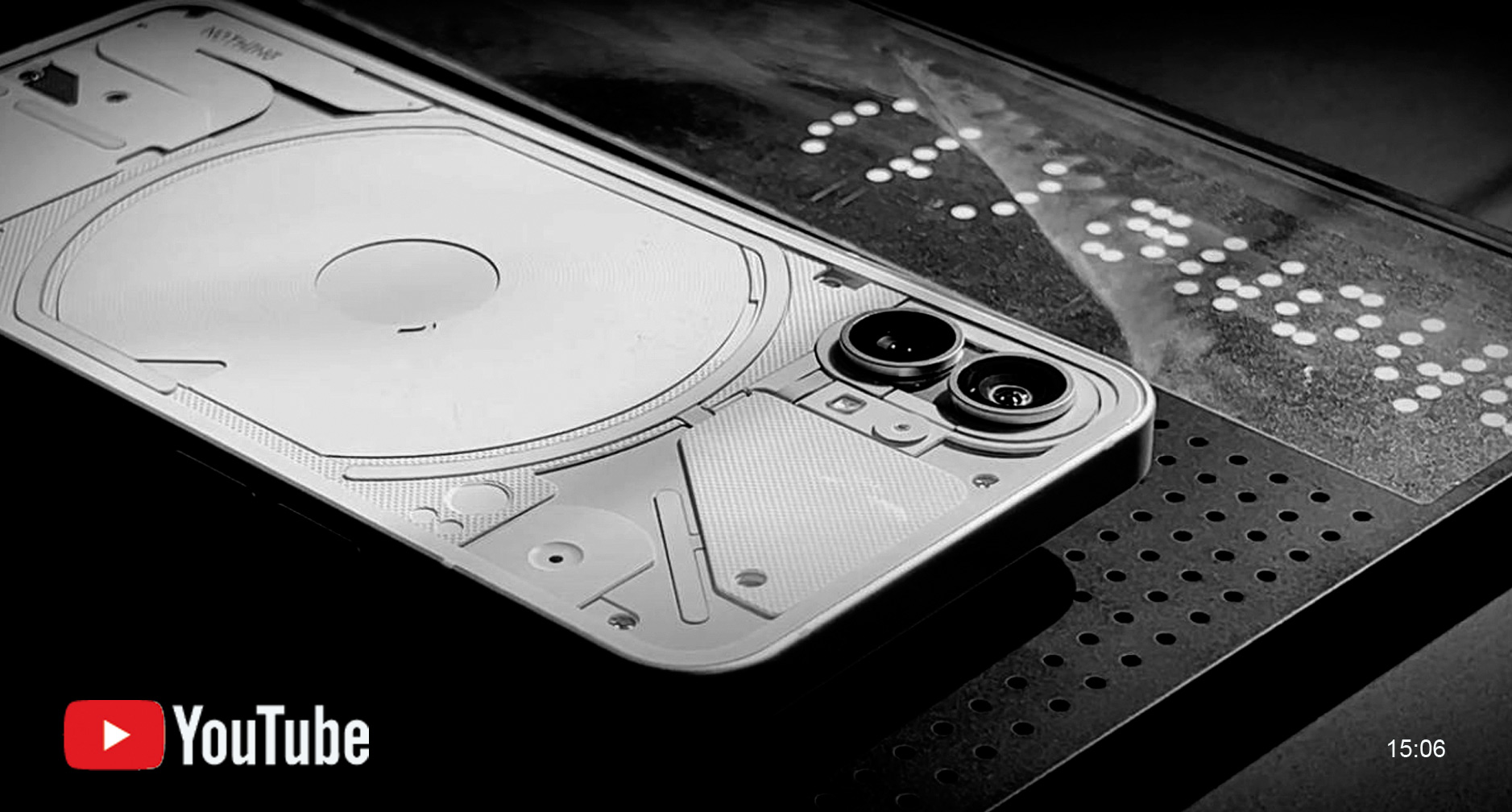
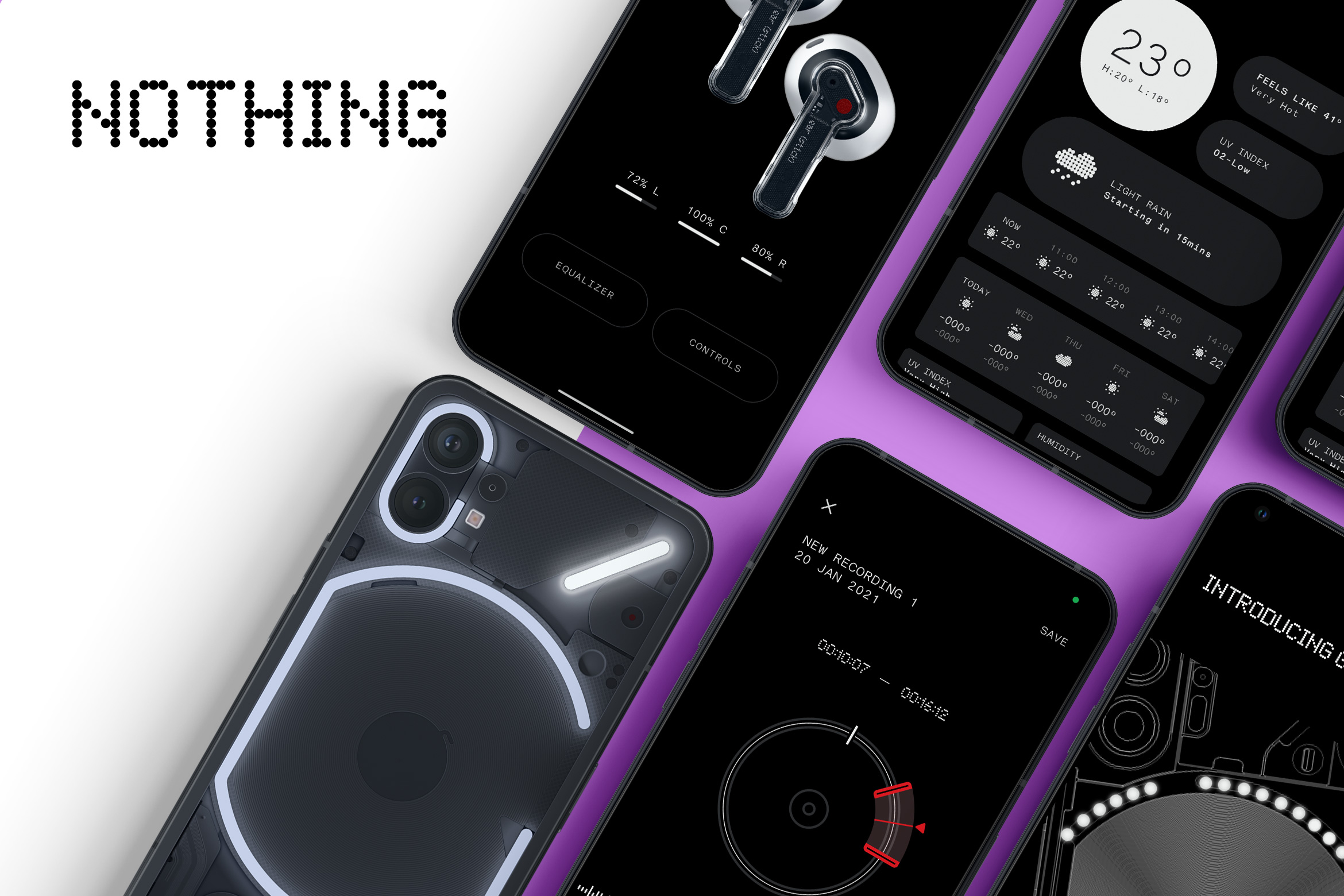
Nothing Technology's vision to create a groundbreaking device also meant that the OS experience had to be in line as well. As part of the Senior UX team, I was responsible for looking at new ways that we could offer already tested apps and experiences. This ranged from the onboarding experience to new ways to leverage the new device technology all the way through to how 3rd parties might best leverage those APIs and display their apps in a new and exciting way.
A new Android Experience
Being based on Android and more specifically the Google Pixel OS Nothing had the opportunity to produce a device centric experience all of their own. The creation of the Glyph interface meant that several apps could be changed to incorporate this new technology. Working alongside designers such as Jasper Kouthoofd at teenage Engineering gave me the chance to see what the boundries of an app such as Camera might become. I took several passes at some "extreme" concepts of the camera app before bringing it back to a more traditional experince. Other apps were things like the Weather app, Voice recorder and the device Glyph interface as well as the onboarding experince which had to echo the look and feel of the brand as well as being focussed on the human learning aspect of the new tech.
A new design
To support the new design of technology that Nothing brought to the market the overall look and feel of the apps for Ear(1) and Earstick needed to be comparable. This entailed several research cycles and adapations to make the new features feel like an iterrative design step


Apple Chorus - Integration App
With a previous MacOS App called ConnectMe due to become depricated there was an immediate need for an new, improved MacOS App to replace it.
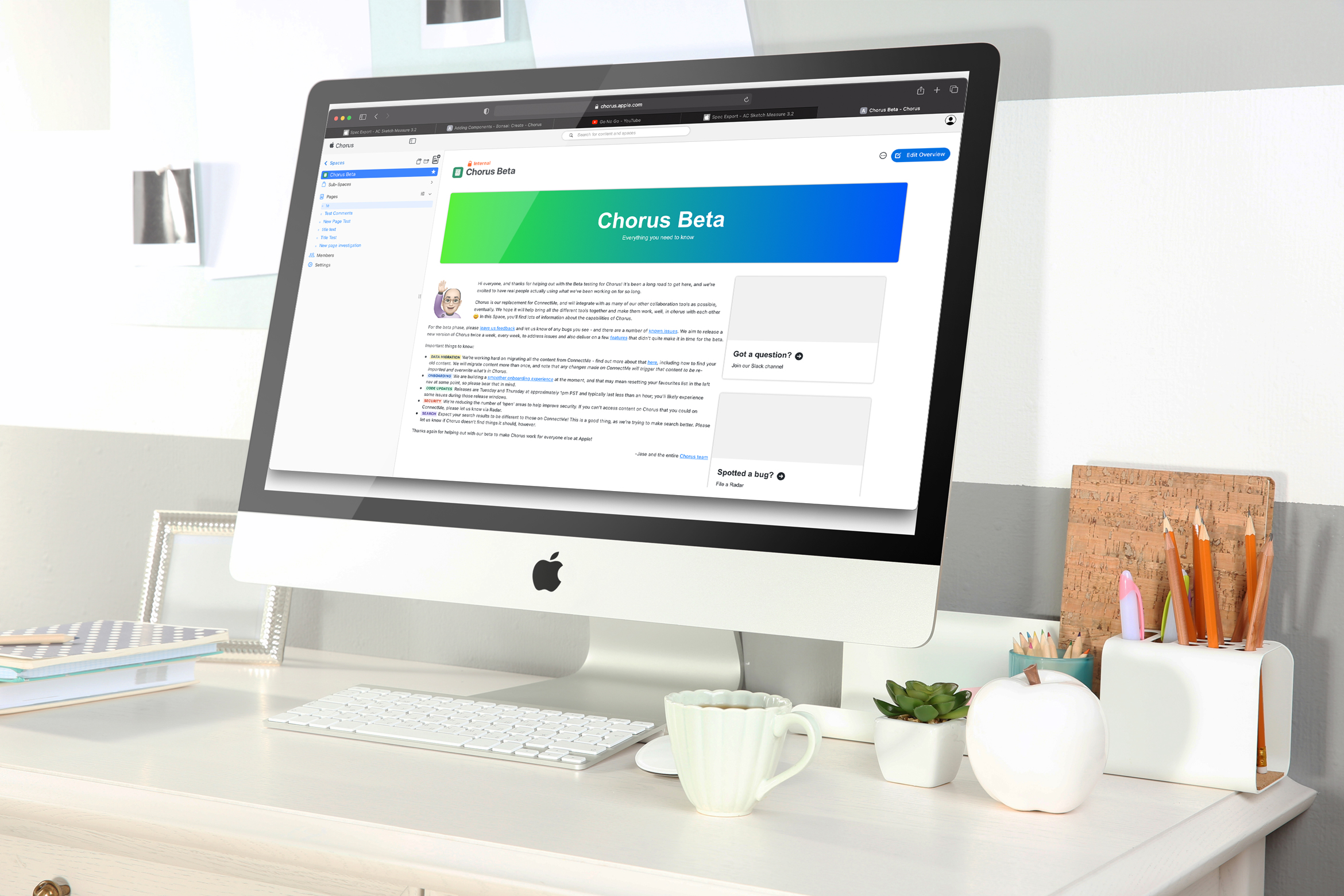
The Chorus app also needed an identity. The Product team went through many rounds of designs and ultimately chose my design. The long term view is to adapt Chorus into a native iPad and iPhone app and will carry the identity on all devices
Scenario Identification and Planning
With Apple adopting many 3rd party apps there was quickly identified a need to have a native app that would keep people informed of @mentions, New Pages, invitations to New Spaces as well as alerts for all of the 3rd party apps that were plugged into the integrations area. The long term view is to 'buy back' users from platforms such as Confluence and also document production in Quip. The ability to keep on top of file sharing applications such as Box was a key factor also.


Dyson Connected App - Lightcycle Morph© App
With the previous success of the Dyson Lightcycle a new version was released to market improving on the original
hardwear design and overall use of the product

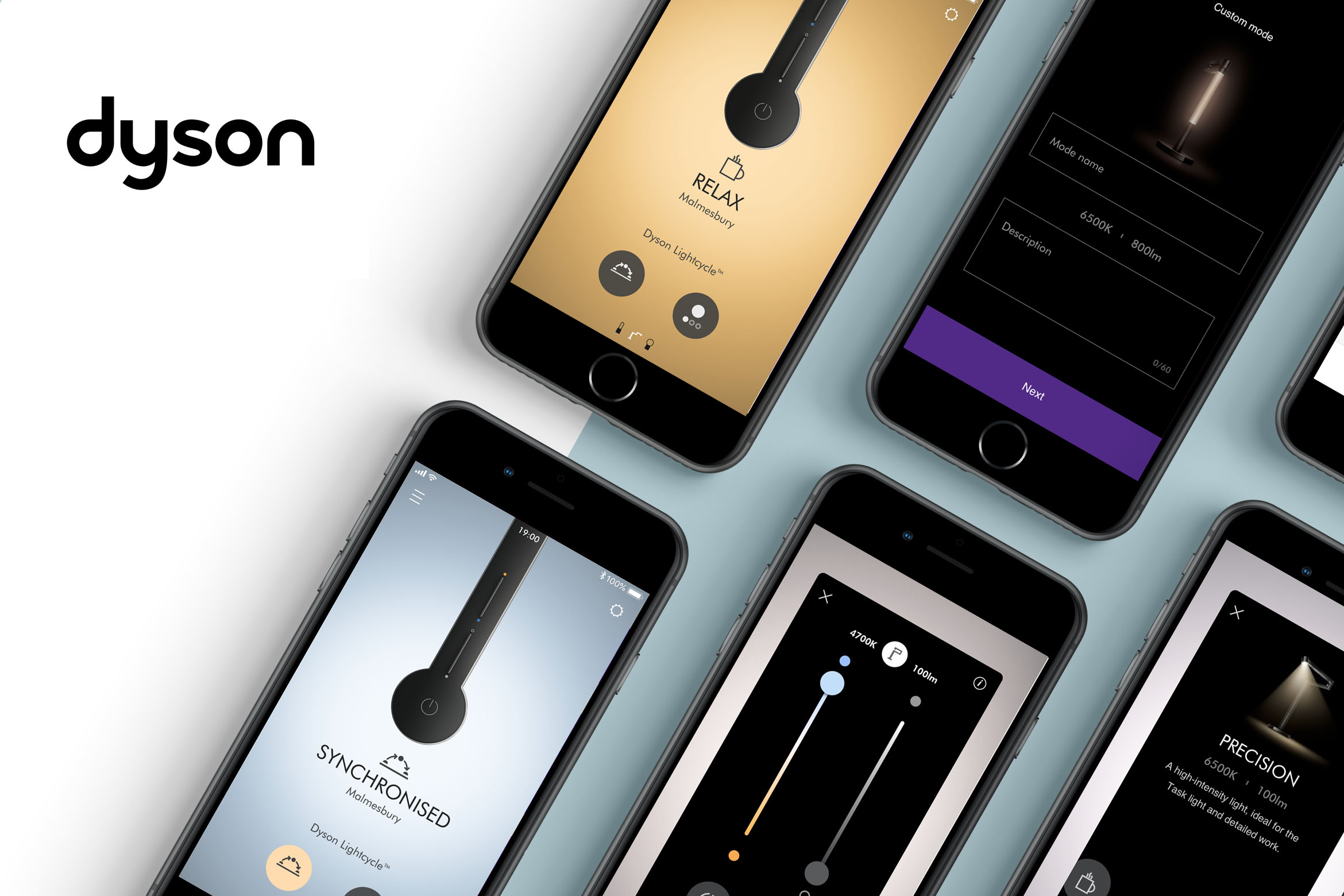
With the success of Dyson Lightcycle the Morph version lends itself to be an ambient, precision and feature light by means of its adjetable head and arm. The light, whilst connected to the app gives the user the ability to change light settings and modes.
Scenario Identification and Planning
The brief was to be a low budget, light touch and as such the previous Lightcycle app was going to be rolled out with a few tweaks. The was after investigation a problem with how the light interacted (or not as the case was) with the app and so a user friendly approach and interface was required whilst also inheriting the functionality of the previous Lightcycle app. What was once thought as a UI change to the current architecture became a change of architecture and a new UX.

Dyson Connected App - Siri Shortcuts
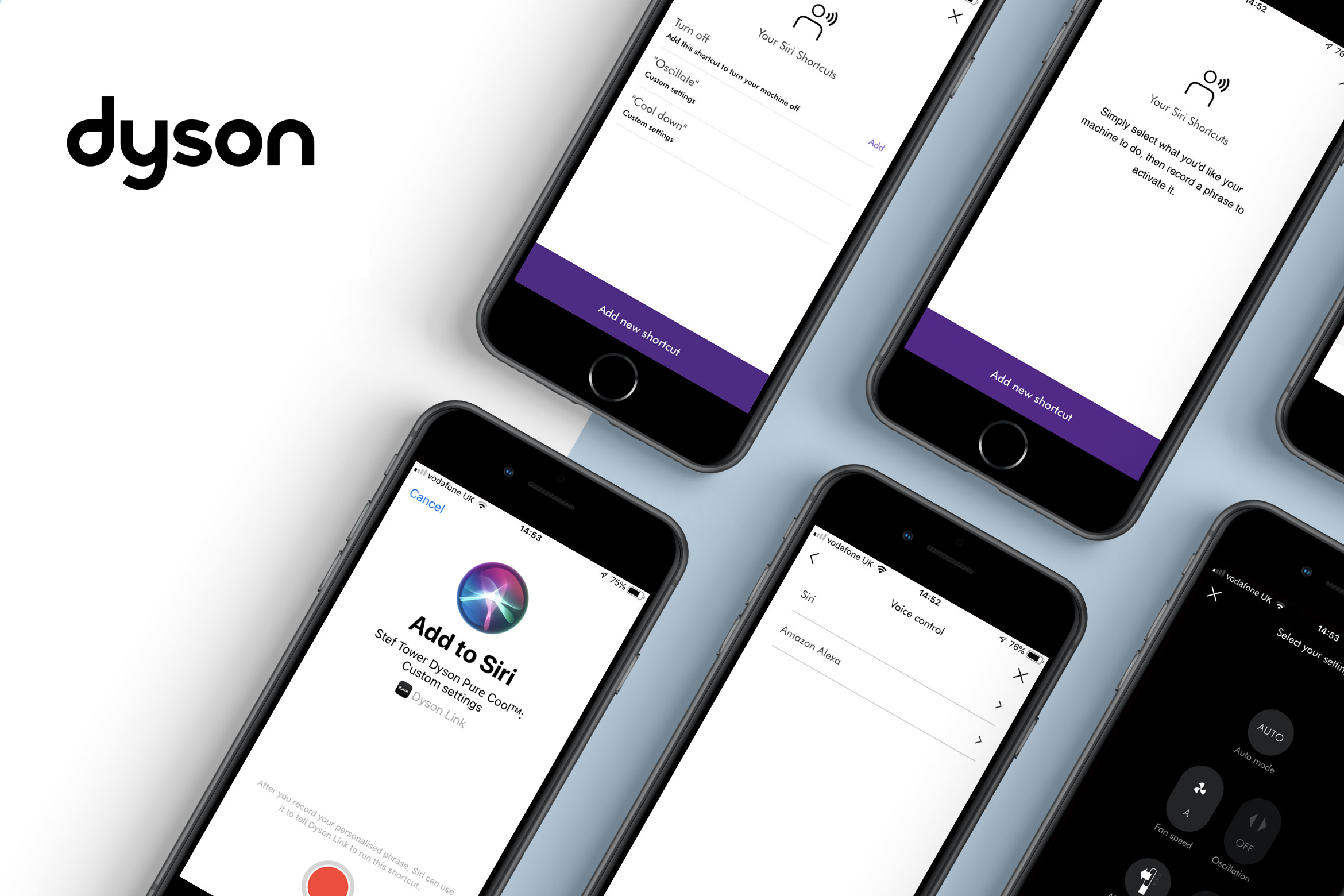
The Siri functionality had been in the planning for sometime. The initial design and spec was issued form the New Product Innovation team with the want to be one of the first apps to hold its own Siri shortcuts in-app.
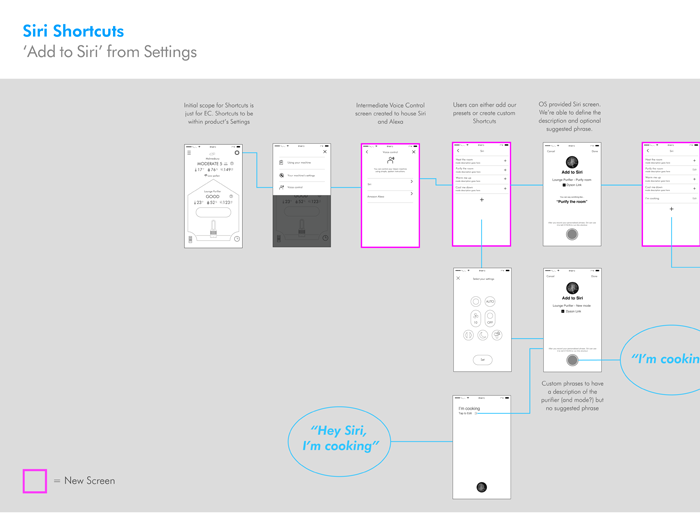
Siri shortcuts for the Dyson connected app were launched early/mid 2019 and have been recieved very weel. It is currently available to Environmental Control products but with a view to rolling it out to all connected products very soon. The overall uptake has been very good and helps back up other accessibility issues that I have been working on.
Scenario Identification and Planning
Wireframes from New Product Innovation were agreed within their teams and handed down to our Connected team for UI 'fleshing out'. It was soon apparent that further UX exploration was needed because of unforeseen technicalities with Siri integration out of a native iOS scenario. Working alongside dev teams we were able to bring an MVP product to market and so improve customer approval.

Wales Audit Office - Work from home and Flex Hours portal
Initial research identified that the Wales Audit Office had 2 main personas to concentrate on. 1: "WAO Wendy" - A newly returned from maternity mum who
needed to be able to work from home whilst at the same time progressing her professional career path, and 2: "WAO William" - A young professional Auditor
who has an active social network and hobbies. Both personas needed the freedom to persue their out of work interests/family but in completely different ways.
"WAO Wendy" needed to have the freedom to do work from homes at a moments notice whilst still going through the necessary channels, whilst "WAO William" needed to keep
a check on his Flexi Hours in a controlled manner.
The issues identified were that homeworking policy must be adhered to when working with sensitive data and flexi working must not take advantage of the organisation.

The overall app worked very well with user testing identifying an easy flow and understanding of the uses of the app. Some user information was pointed out and a further instruction page was included. Back end coding was more complicated and internal IT spent time developing MySQL databases to handle the uptake in success and use of the app.
From Initial Persona identification and hand-dawn wireframes
We moved on from hand drawn wireframes to flow chart cards in Sketch. Giving the overall layout and page flow necessary to identify proper flow from one page to the next. Necessary break points such as settings pages, and image uploads were also identified. Being a bilingual the user point to be able to swith the whole application into Welsh was also identified.


Bestie - Kids Safety Smartwatch
The product is one of a kind on the market and combines up to date functionality with GPS safety features to keep a track on children. The development
of the watch combined 2 elements. 1: The user screens for the watch. These had to be easy to navigate and use due to the age reange of the end users, around 5-12yrs.
and 2: The iPhone app to both recieve reports from the watch and also connect to the watch when necessary.
The parent app has the ability to recieve emergency reports from the watch should a watch user stray out of an alloted area and in the event of an SOS situation.
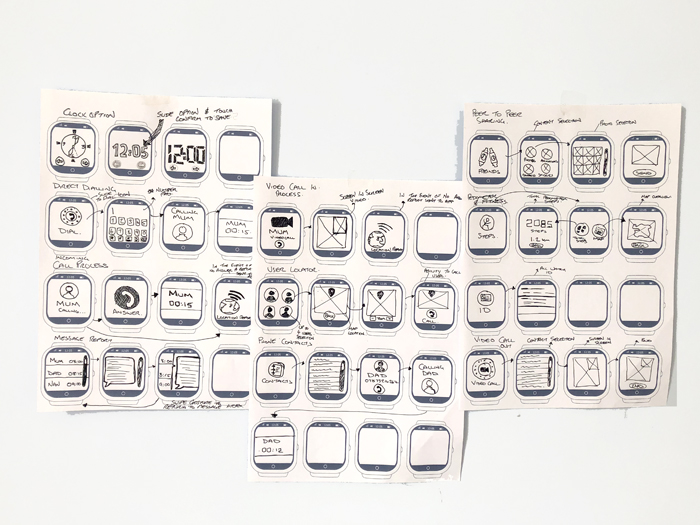
The UI for both watch and phone are still at developer stage. There have, to date, been several issues with privacy regarding The Internet of Things on the continent with Germay taking the lead in putting regulations on such products. The user feedback from the watch is positive with the feedback from the phone application being a bit more complicated. It is a work in progress and we are looking to be somewher nearer the mark pre Christmas 2018.
Scenario Identification and Planning
Hand drawn scenarios drawn over a watch template that we produced in Adobe Illustrator. This allowed very quick but more acurately scaled sketches to go onto Sketch wireframes and ultimately fully rendered UI screens. The scenarios were laid out as a swipe style that led from an adjustable style clock, to a dial out system, Messaging system, Video call, Contacts, Peer to Peer sharing ability, User Locator, Pedometer and finally Watch ID and profile.


PMI - Press Metal International
The product is one of a kind on the market and combines up to date functionality with GPS safety features to keep a track on children. The development
of the watch combined 2 elements. 1: The user screens for the watch. These had to be easy to navigate and use due to the age reange of the end users, around 5-12yrs.
and 2: The iPhone app to both recieve reports from the watch and also connect to the watch when necessary.
The parent app has the ability to recieve emergency reports from the watch should a watch user stray out of an alloted area and in the event of an SOS situation.
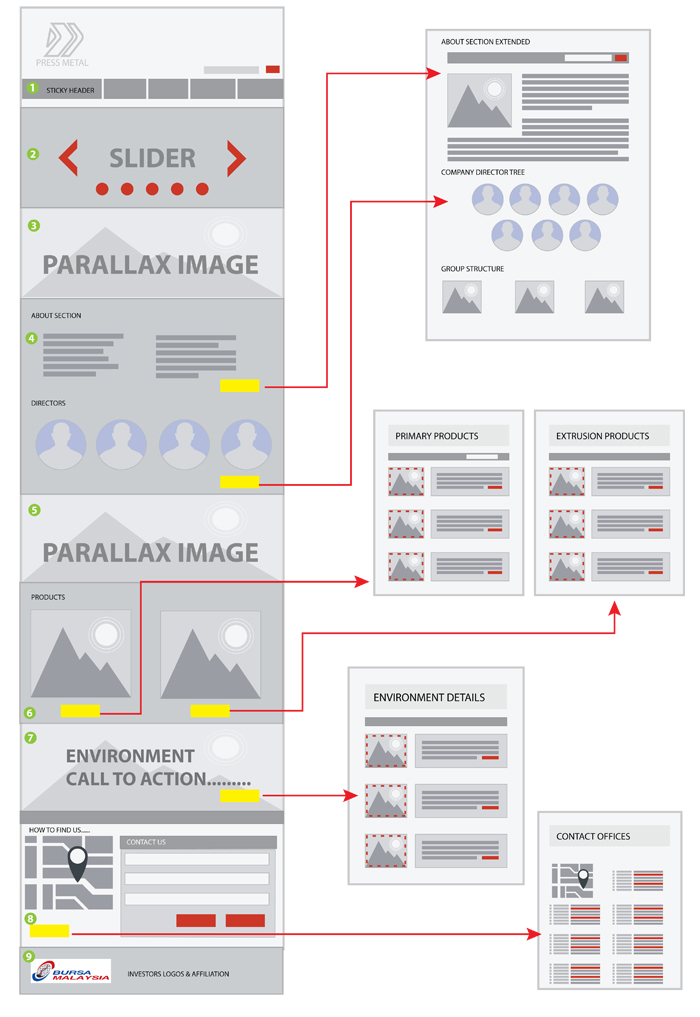
Scenario Identification and Planning
Hand drawn scenarios drawn over a watch template that we produced in Adobe Illustrator. This allowed very quick but more acurately scaled sketches to go onto Sketch wireframes and ultimately fully rendered UI screens. The scenarios were laid out as a swipe style that led from an adjustable style clock, to a dial out system, Messaging system, Video call, Contacts, Peer to Peer sharing ability, User Locator, Pedometer and finally Watch ID and profile.